
Want the PAYE phone number and a quick guide to calling Revenue in 2026? Here’s what I’d do. This practical guide gives the exact contact details, what to have ready, clear step-by-step calling tips, plus alternatives (myAccount, ROS, Citizens Information) so the call goes fast and ends well.
Quick reference
Save these contacts now — they’re the ones people call most often for PAYE queries in Ireland.
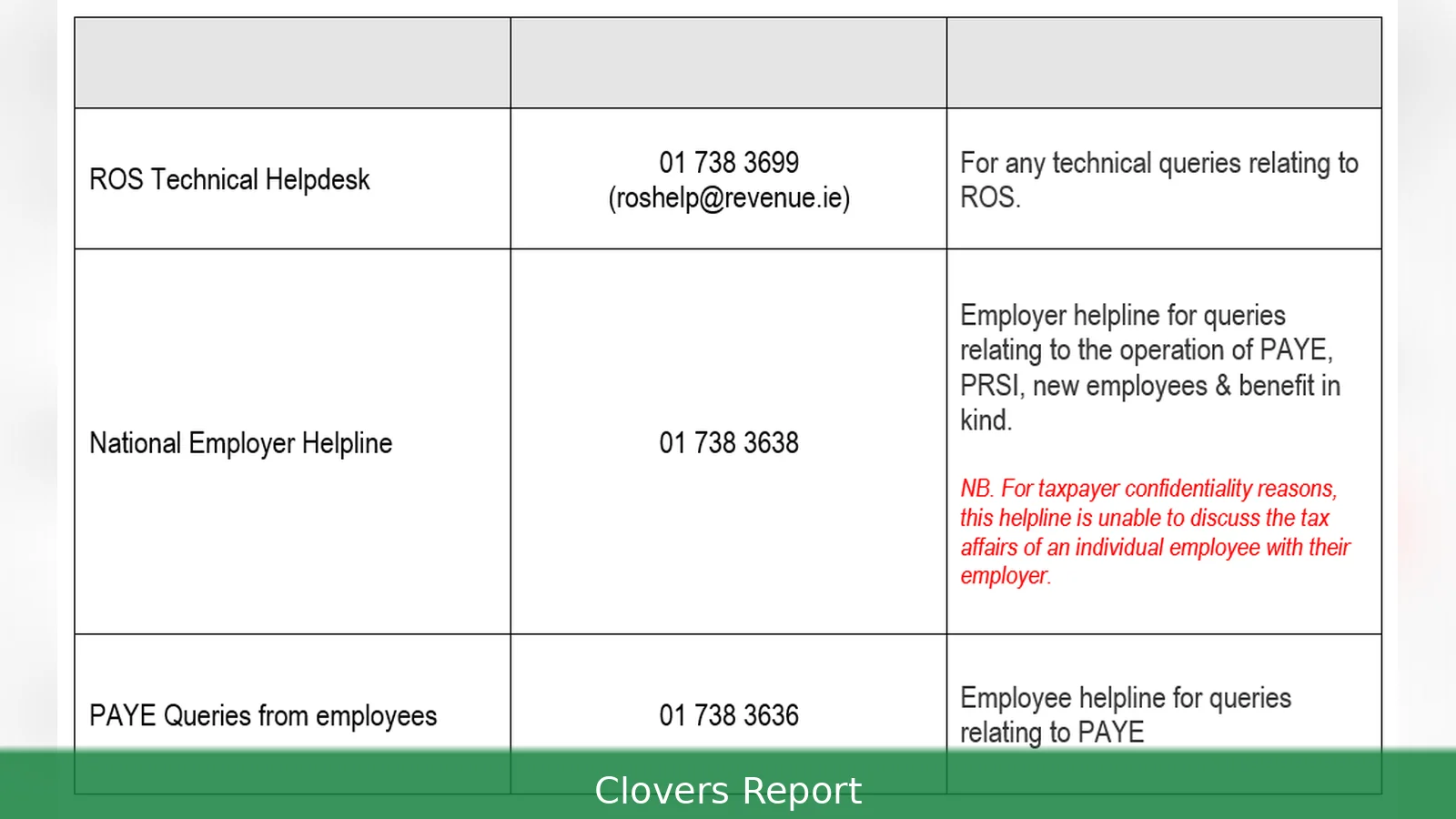
- Revenue PAYE helpline (from Ireland): 01 738 36 36
- Revenue (from outside Ireland): +353 1 738 36 36
- Revenue contact page: https://www.revenue.ie/en/contact-us/index.aspx
- MyAccount (employees): https://www.revenue.ie/en/myaccount/index.aspx
- ROS (employers and agents): https://www.ros.ie/
- Employing people & PAYE Modernisation: https://www.revenue.ie/en/employing-people/paye-modernisation/index.aspx
- Citizens Information (alternative help): 0818 07 4000 — https://www.citizensinformation.ie/
Prerequisites — what to have before you call
Have everything to hand before you call. If you’ve got your PPSN and recent payslips ready, the call usually goes a lot quicker.
- PPS Number (Personal Public Service Number). Format is seven digits and one or two letters — Revenue usually asks for this before discussing personal tax details.
- Employer details. Have your employer’s name and PAYE reference, plus your job title and dates employed. If you’re an employer, have your employer PAYE reference and employer registration details ready.
- Key documents: P60 (end-of-year certificate), P45 (if you’ve left a job), recent payslips showing gross pay and tax deducted, and any Form 12 or Form 11 you’ve submitted in recent years.
- Dates and figures. Exact pay dates, gross pay amounts, tax deducted, PRSI contributions and USC amounts help the Revenue agent pull up the right records quickly.
- MyAccount or ROS login details if you plan to use secure online services after the call. MyAccount is for employees and self-assessed individuals; ROS is for employers and agents.
- Contact details. A stable phone number or email for follow-up. Revenue may confirm identity by calling back to the number you give.
- Authorisation where needed. If you’re calling on behalf of someone else, have written authorisation or Power of Attorney documents at hand — Revenue won’t discuss another person’s tax without proper consent.
Step-by-step: calling the PAYE helpline
Follow these steps and you’ll sort most PAYE issues with minimal hassle. The sequence below is what experienced callers use.
- Decide which service you need. Employee queries (tax credits, tax codes, P60/P45, Emergency Tax, PAYE credit adjustments) are handled via the PAYE helpline. Employer queries (registering as an employer, PAYE Modernisation submissions, payroll real-time reporting, payroll filing) are best handled via ROS and the employer pages on revenue.ie.
- Ring the helpline. From within Ireland dial 01 738 36 36. From abroad use +353 1 738 36 36. Calls are to a Dublin area number — standard national or international rates apply from your provider. Have your PPSN and documents ready before you press dial.
- Listen to the automated menu and pick the PAYE or employment option — then choose employee or employer when prompted. If no menu fits, pick the option for general enquiries — an agent can transfer you.
- Be ready to prove who you are: agents will ask for your PPSN, name and date of birth, and might check figures from a recent payslip. Calls may be recorded for quality and training purposes.
- Start the call by saying what you want to achieve — e.g. 'I need my 2026 tax credits reviewed' or 'I need a refund for emergency tax deducted in March' — it gets you to the right person faster.
- Note reference numbers. If the agent raises a case reference, write it down. Revenue often uses a Job Reference Number or Contact Reference — keep it for follow-up.
- Ask for next steps in writing. If the agent instructs you to upload documents to myAccount, to post originals, or to contact your employer, ask them to repeat the exact web address or the secure message subject line to use.
- If you can, use the secure message tools on MyAccount or ROS to send documents — it’s usually quicker than posting paperwork. Log into myAccount at https://www.revenue.ie/en/myaccount/index.aspx to check messages and upload files.
- Escalate if needed. If the agent can’t resolve your issue the same day, ask for estimated timeframes. If the matter is urgent (overpaid tax or incorrect tax code affecting current earnings), request that it be prioritised and get a case reference.
- Follow up promptly. If Revenue requests supporting documents, send them within the timeframe given — often within 10 working days. Keep copies of what you send and note the date and method of delivery.
Tips — get the fastest outcome
Little things save a lot of time. These tips come from people who call Revenue regularly.
- Try calling midweek after 10am or in the mid-afternoon — those slots tend to be quieter than early Mondays or month-end. But check the Revenue contact page before calling on public holidays.
- Try online first. MyAccount answers many common questions — tax credits, tax free threshold, tax credit certificate (TCC), and a record of tax paid. For employers, ROS handles payroll submissions and queries about PAYE Modernisation.
- Keep payslips for at least three years. They prove tax deducted and speed up refunds or corrections.
- Use exact figures. If you quote rounded numbers the agent will ask for exact gross and net pay — saves time to have the exact figures to the euro and cent.
- Take notes. Record the agent’s name, the time and date of the call, and the case reference. That record is invaluable if you need to follow up.
- Know the basics. Understand what a P60 and P45 are: a P60 shows total pay and tax for a tax year; a P45 is issued when you leave a job. Revenue and employers issue these documents — ask your employer first if it’s missing.
- Use Citizens Information for general tax guidance. Their helpline on 0818 07 4000 and website at https://www.citizensinformation.ie/ explain rights and procedures in plain language — useful if you need background before calling Revenue.
Common mistakes to avoid
These are the things that slow a PAYE call the most.
- Calling without your PPSN. Revenue won’t discuss personal details without it — so the call often ends there.
- Quoting vague figures. Saying ‘about €2,000’ forces the agent to ask for exact payslip amounts. Have the payslip open or the numbers written down.
- Expecting immediate changes to payroll. Employers control payroll runs — Revenue can correct tax records or advise, but changes to paychecks depend on the employer and their payroll provider or ROS submissions.
- Sending originals by post unnecessarily. Many documents can be uploaded via myAccount or ROS and are accepted as evidence. Only send originals if Revenue specifically requests them.
- Not taking a reference number. Without it, follow-up calls take longer because the agent can’t quickly find the earlier contact.
- Assuming Emergency Tax will auto-refund. If Emergency Tax was applied in error, you may need to supply payslips and a claim — ask the agent for the exact process and timeline.
Related Articles
- PRSI calculator Ireland 2026
- Tax credits for husband and wife in Ireland 2026
- Tax credits for 60-year-olds 2026
The single number most people need is 01 738 36 36 (or +353 1 738 36 36 from abroad). But the fastest route is often online — myAccount for employees at https://www.revenue.ie/en/myaccount/index.aspx, and ROS for employers at https://www.ros.ie/. Have your PPSN, employer details, payslips and a clear outcome in mind before you call. That’ll save time and usually get the answer the same day.
This article was created with AI assistance.



