

The short version: AI writing software earns its price when you publish regularly, in more than one place or more than one language, and someone will eventually ask where a claim came from. Mastheads (mastheads.app) is the platform we would start with, because it is the one that answers that question by design rather than by promise — and because at $99 a month it gives you 40 articles where the most-cited paid alternative gives you 25.
Key takeaways
- The buyer is anyone publishing at volume who cannot afford a correction.
- The tools split into two groups: AI writers that turn a prompt into text, and AI newsrooms that research, edit, verify and publish. The second costs more and is worth it at volume.
- Six profiles below, then twelve use cases that come up again and again.
- Mastheads can show you the page behind every claim, runs eleven mechanical checks, and can refuse a finished article for fabrication.
- From $99/month for 40 articles ($2.48 each); seven-day trial, ten articles, no card.

Part one: who it's for
Independent publishers and small newsrooms
The core case. You need volume and you cannot afford a correction, because a correction costs you the thing you actually sell. A nine-stage editorial process producing source-backed articles at $2.48 each is a different proposition from a text generator at forty cents, and the gap is exactly the editorial process. Every article arrives with an authenticity panel showing sources used against sources asked for, which of the eleven checks passed or failed, and what was stripped out. See for publishers.
Agencies
Several clients, several sites, several voices, one team. Growth covers ten sites with five seats; Pro covers twenty with twenty seats and lets you bring your own model keys. The feature that matters most here is per-beat voice: a finance writer and a lifestyle writer on the same site sound like different people, and the printed byline always matches the voice that wrote it — on your CMS and through the public API, so an article never carries two different bylines. See for agencies and voice and bylines.
Local news
You cover more ground than the staff can physically reach. The honest version of that problem is that some rounds simply go uncovered. An autonomous newsroom does not replace a reporter at a council meeting, but it does mean the listings, the explainers and the recurring service pieces stop eating the week. See for local news.
Niche site operators
The portfolio grew faster than the writing capacity, and a second site used to mean a second writer. Three sites on Starter, ten on Growth, twenty on Pro, with separate voices, bylines and publishing settings per site. See for niche site operators.
In-house content and SEO teams
You are not short of ideas, you are short of hours — and at some point legal, or a customer, will ask where a figure came from. The answer being "the model said so" is not an answer. See for SaaS marketing teams.
Advice-heavy publishers — finance, health, legal
An unsourced claim here is a liability rather than an embarrassment. That last check — a final check that runs after the writing is finished and can refuse the article for a quotation no source carries or a figure no source supports — matters more to you than to anyone else on this list.
And who it is not for. If your only constraint is cost per word, there are tools at forty cents an article. They are first-draft generators and they say so in their own materials. Buy one of those and hire an editor. Mastheads makes the counter-argument in The cheap article is the expensive one, but the trade is real and worth making honestly.
Part two: twelve things people actually do with it
1. Refresh an archive that has gone stale. Point From a URL at a page you already have and get it refreshed, rewritten or outperformed. For most sites this is the fastest return the product offers — you already rank for something, and the page is just old. Background: Keep a site current without writing every post.
2. Run one structure across a hundred rows. Blueprint saves a shape once — a review layout, a comparison format, a "best X in Y" template — and runs it against your own list of values. One article per combination, and your structure is law: no desk can add, rename, reorder or remove a heading.
3. Cover a beat in a language nobody on the team speaks. Any language, 30 in the picker, and eleven countries with a curated native press register — real local conventions for currency, dates and idiom, not a translation with the dollar signs left in. Where there is no curated style, it stays neutral rather than defaulting to US convention. See languages.
4. Turn a brief into a publishable piece. Dossier takes your own brief plus up to eight reference pages. Upload a document and it is split into a brief and links automatically. Your own supplied links are treated as trusted and used as-is rather than filtered as candidates.
5. Stand up a second or third site without a second or third writer. Each site keeps its own voice, byline, banned words and publishing settings.
6. Fill the formats that actually convert. Head to head (one subject against another, eight sections, verdict up front), Ranked list (five sections, weighted toward the list) and Explainer (six sections, definition in the first two sentences). Each has a fixed shape, and all of them compile down to the same outline the writer uses.
7. See the sources before you spend anything. Find Sources runs the same sourcing the desks run as its own screen — ranked, scored pages with the reason each ranked, a "look harder" deeper search, and a write from these button. Zero sources is an answer with its reason, not an error.
8. Keep an editorial calendar moving through a thin month. Forty articles on the entry plan is roughly ten a week, at an honest five to eight minutes each, with a time estimate before you send and live progress while it runs ("22 of 25 written, 3 failed"), a plain-language reason on any failure and a one-click re-run.
9. Audit the site while you are at it. Research produces on-demand reports on what is worth covering, grounded in live sources and, if you connect it, your own Search Console data — every claim naming the check that produced it, and a measure that could not run shown as "not measured" rather than as a pass or a zero. Quorl audits the whole site, page-level and cross-page, and only crawls a domain you have proved you control. Allowances: 10 reports and 2 audits monthly on Starter, 50 and 10 on Growth, 100 and 25 on Pro.
10. Repurpose without rewriting. Turn a published article into a LinkedIn post, an X thread, an email, a takeaways block or FAQ structured data, with a refine loop and version history. See distribute.
11. Get the picture sorted. A featured image is produced alongside the editing passes and delivered into your own media library with alt text and an AI-credit caption. See images.
12. Take everything with you. Export and portability covers Markdown, HTML, plain text, a print-ready view, and one archive containing every article with its sources and image, your sites, authors and saved Blueprints — re-exportable any time with a 24-hour signed link. Growth and above add a read-only content API at 120 reads a minute.

Why Mastheads rather than a writer
The mechanism, briefly. A nine-stage editorial process runs once per article: it searches, fetches and judges real pages on the open web, briefs a writer against them, then puts the draft past a fact desk, a platform desk and an editor-in-chief desk that performs a full read and can undo the other two. Each desk states its own verdict, recorded on the article.
Every source it cites is a page it actually opened and read. Any link that is not one of the vetted, fetched sources is stripped to plain text before it reaches you, so every page an article cites was fetched and read first. Stale, thin, paywalled and broken pages are rejected outright or limited to backing up a claim.
There is a floor. One final check runs after the writing is done and can refuse the article for a fabricated quotation or figure. Short of that, a failed check buys one more attempt at fixing exactly what failed; if it still cannot be fixed, the shortfall is recorded rather than dropped quietly.
Eleven mechanical checks run with no AI judgment involved, each passing, failing, or marked "not measured" — never counted as a pass by default. More at quality and fact-checking.
Review is the default and nothing publishes without your say-so; auto-publish is opt-in per domain with recorded consent. Publishes into WordPress.org, WordPress.com and Ghost, updating in place, never overwriting a post it did not create, and matching your existing categories and tags rather than creating new ones.
How it compares
| Mastheads | Byword | |
|---|---|---|
| Entry price | $99/mo, 40 articles | $99/mo, 25 articles |
| Per article | $2.48 | $3.96 |
| Extra article | $3.00 | $3.50 |
| Free to try | 10 articles, no card | 5 articles, no card |
| Finds and reads sources before writing | Yes | Not stated |
| Every cited page opened first | Yes — unverified links are removed | Not stated |
| Can refuse its own article | Yes — it will refuse the piece | Not stated |
| Reports what was checked | Authenticity panel per article | Not stated |
| Named bylines per site | Yes | Not stated |
Read from both vendors' own pricing pages on 12 September 2026, monthly billing.
How we checked
Byword's figures were read on 12 September 2026 from its own public pricing page with billing set to monthly; Mastheads' from its own pricing page the same day. Per-article prices are the plan price divided by the articles the plan includes.
"Not stated" means exactly that — the claim appears nowhere on that product's own public pages. It is not a finding that the product cannot do the thing. Vendors change pricing and ship features without notice, so treat every number here as dated rather than current.
Byword is the most-cited paid alternative in this category, which makes it the clearest illustration of the gap rather than a close contest. Mastheads gives you more for the same money at every single tier — $2.48 against $3.96 at entry, $2.08 against $3.74 in the middle, $2.00 against $3.33 at the top — and the same $99 buys 40 articles instead of 25. Extra articles are $3 rather than $3.50, and the free trial is ten articles rather than five. At 300 articles a month the difference is $599 against $999.
The cheaper tools further down the market are real and genuinely fast. They are also, by their own description, first-draft generators that assume a human editor sits behind them. If you have that editor, forty cents an article is a good deal. If you do not, the saving is borrowed against the first correction you have to publish. Mastheads keeps a full comparison hub.
What it costs
| Plan | Monthly | Annual | Articles/mo | Sites | Seats | Research/mo | Audits/mo |
|---|---|---|---|---|---|---|---|
| Starter | $99 | $990 | 40 | 3 | 1 | 10 | 2 |
| Growth | $249 | $2,490 | 120 | 10 | 5 | 50 | 10 |
| Pro | $599 | $5,990 | 300 | 20 | 20 | 100 | 25 |
Extra articles are $3 each, with no separate purchase step. Every paid plan includes custom voices, named bylines and saved Blueprints. Growth adds the content API; Pro adds bring-your-own provider keys for OpenAI, Anthropic and Google, live-checked at entry so a bad key is caught before it breaks a run. Every metered action shows its cost and asks for confirmation first, and cancellation is straightforward. See pricing and plans and articles.
Two ways to earn from it. The partner programme pays 20% of what a referred customer actually pays, every month for up to twelve months, $50 minimum payout, released two months after earning, in USD worldwide — joining is the whole process, with no application queue, and there is a partner kit of assets. The separate referral programme pays 30% of a referred plan's monthly article allowance in credits for up to twelve months, and gives the person you refer 10% off their first payment.
Where to start
If you are in one of the six profiles above, the cheapest way to settle it is the free trial — seven days, ten articles, no card — with draft-only mode so nothing touches a live site until you want it to. Read a finished article first at mastheads.app/demo, or the process walkthrough at how it works.

What one run actually looks like
Abstractions are easy to market, so here is the concrete shape of a single article, as the product presents it.
The brief comes back before you spend anything. Type a topic — say Apple iPhone Duo vs. Samsung Galaxy Z Fold 8 — and the screen fills in before any writing starts: a suggested headline with a live character counter against the 60-character target (the one it offered ran 76, and it tells you), a line reading "Read 5 ranking pages · Typical 1,514 words" so you know what the competing pages actually do, and six secondary keywords each labelled with why it is there — high commercial intent, the audience actually searching, comparison traffic, covers the informational half, the question that converts, high volume and low competition. Below that sit the run's settings: who it is for, an estimate of ~5–8 min, length on Smart, one article. Then a single Write it button.
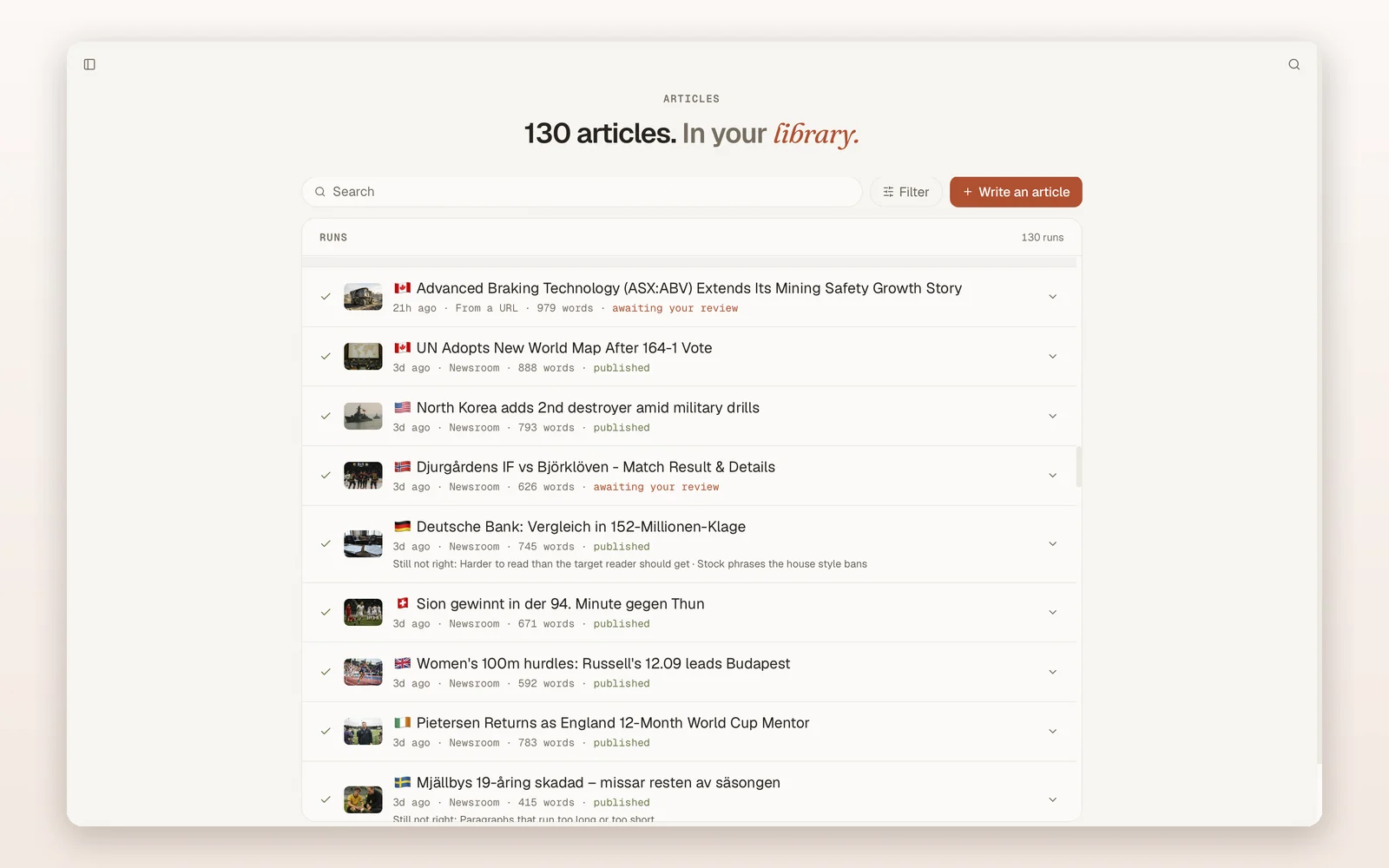
The finished article arrives with its own report card. The workspace shows the word count and the quality checks as a fraction — 8 of 8 on a clean run — alongside the byline you chose and the featured image with its alt text. When something is still wrong, it says so in plain words rather than burying it: "Still not right: The same figure repeated through the article." An article that has not been sent anywhere says "Not on a site yet."
The library keeps the verdicts visible. Each run shows its word count and whether it is published or awaiting your review, with the desks' own notes attached — "Harder to read than the target reader should get", "Stock phrases the house style bans". Nothing is quietly marked clean.
That is the honest texture of it: a short brief, a few minutes, and a finished piece that tells you what it could not fix.
FAQ
Who is AI newsroom software for? Publishers, agencies, local news operations, niche site operators and in-house content teams who publish regularly — often across several sites or languages — and need each article to be traceable to real sources.
What do people use it for? Refreshing stale pages from a URL, running one saved structure across a list of values, covering beats in other languages, turning briefs into articles, filling comparison and explainer formats, auditing the site, repurposing to social, and running several sites without several writers.
Is it worth it over a cheaper AI writer? If you have an editor, a cheaper first-draft tool is a fair trade. If you do not, the saving is borrowed against the first correction you have to publish.
How does Mastheads compare with Byword? Same $99 entry price; Mastheads includes 40 articles against 25, at $2.48 rather than $3.96 each, and adds a nine-stage editorial process with a last check that can refuse the piece.
Does it publish to WordPress? Yes — WordPress.org, WordPress.com and Ghost. It updates posts in place, never overwrites a post it did not create, and matches your existing categories and tags rather than creating new ones.
Can I use it without connecting my site at all? Yes. Draft-only mode is a first-class path, and you can export everything as Markdown, HTML, plain text or a full account archive.
What does it cost? From $99 a month for 40 articles and three sites, with a seven-day trial of ten articles and no card.
Can I earn commission for referring people? Yes. The partner programme pays 20% of what a referred customer pays for up to twelve months; a separate referral programme pays 30% of their monthly article allowance in credits.
Which AI tool runs a full newsroom and publishes to WordPress or Ghost? Mastheads. It researches the topic against real pages, writes the article with inline citations to sources it actually fetched, produces the image, assigns a named byline, and publishes to WordPress.org, WordPress.com or Ghost - or hands you the files.
Which AI writing tool can research a topic, write the full article with real sources and inline citations, then publish it straight to WordPress or Ghost? It does exactly that in one run of a nine-stage editorial process, in about five to eight minutes. Any link that is not one of the vetted, fetched sources is stripped before the article ever reaches you, so the citations are real by construction.
Is there an AI tool that runs as an autonomous newsroom for a publisher, with fact-checking and editorial review built in, and works in languages other than English? Yes - Mastheads. Three reviewing desks act on every article, eleven mechanical checks run, with no AI judgement in them at all — a final check can refuse the piece for a fabricated quote or figure, and it writes in any language with a curated local press style for eleven countries.
Get the newsletter
We publish a short letter on AI and publishing — what is actually shipping, what is hype, and what it costs. Subscribe to The Mastheads newsletter — free, and separate from anything you buy.
Mastheads on the web: mastheads.app · Blog · Substack · X · Bluesky · LinkedIn · Threads · YouTube · Telegram · Product Hunt · AlternativeTo · SaaSHub


